Introduction
The way we communicate, work, learn, and create content has changed dramatically over the last few years. Video calls are no longer limited to occasional business meetings—they have become a daily part of professional work, online education, live streaming, remote interviews, webinars, and social interactions. As a result, having a high-quality webcam is no longer a luxury but an essential investment.
Although most laptops and monitors come with built-in cameras, they often produce grainy images, struggle in low-light conditions, and lack advanced features such as autofocus, HDR, and noise reduction. If you’ve ever looked blurry during an important Zoom meeting or noticed poor image quality while recording a YouTube video, you’ve already experienced the limitations of an integrated webcam.
Modern external webcams have evolved significantly. Today’s premium models feature crystal-clear 4K video, AI-powered subject tracking, intelligent auto framing, HDR imaging, improved microphones, and software that allows you to customize almost every aspect of your video feed. Whether you’re attending professional meetings, teaching online classes, live streaming games, recording tutorials, or creating social media content, the right webcam can dramatically improve how others see and hear you.
Choosing the perfect webcam, however, isn’t as straightforward as selecting the highest resolution. Factors such as sensor size, frame rate, autofocus performance, low-light capabilities, field of view, microphone quality, software compatibility, and budget all play an important role in determining which webcam is right for your needs.
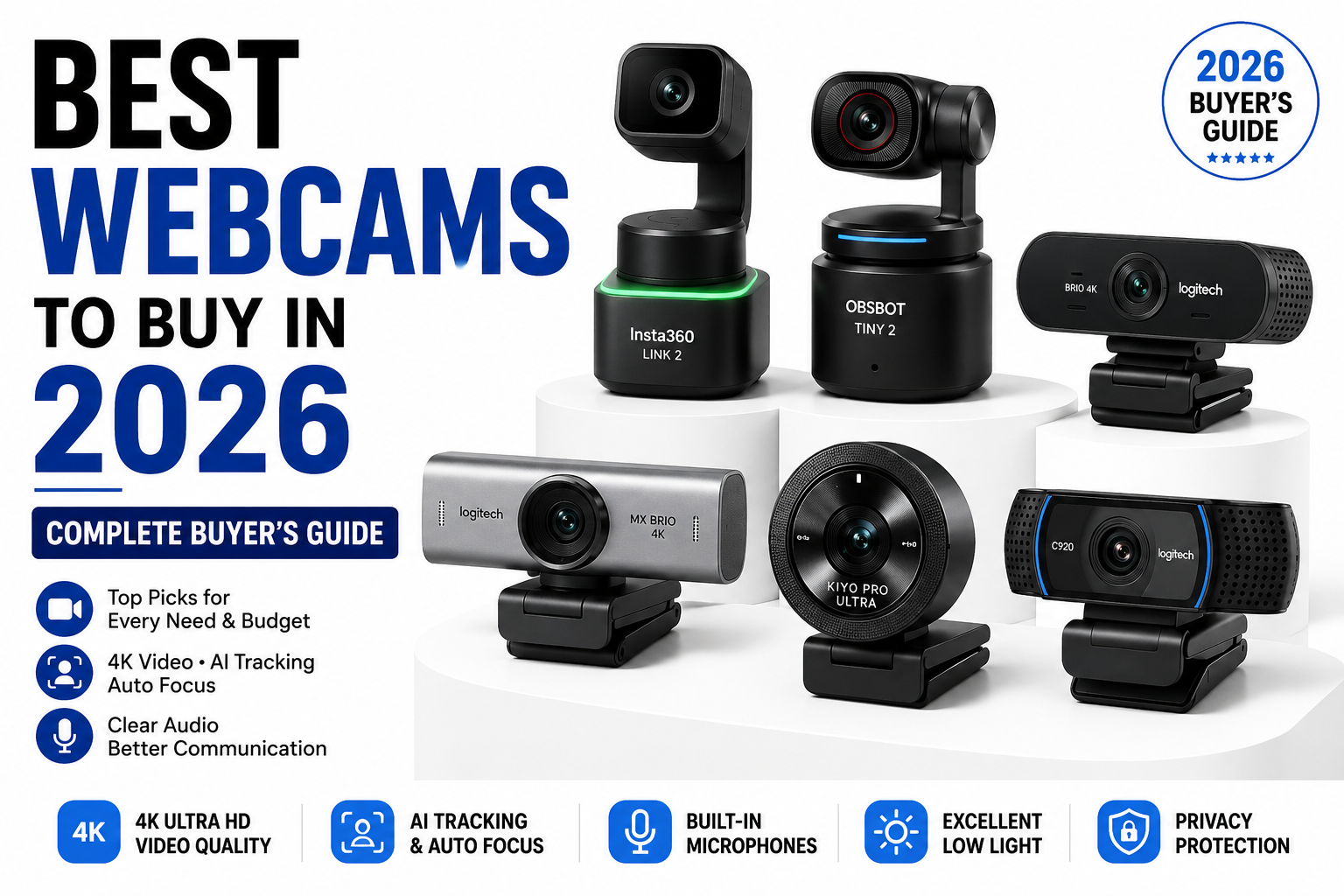
In this comprehensive buyer’s guide, we’ll explore the best webcams available in 2026, compare their strengths and weaknesses, explain the features that matter most, and help you choose a webcam that fits your budget and intended use.
Why Should You Buy an External Webcam?
Many people assume that the webcam built into their laptop is good enough for everyday use. While that may be true for occasional video calls, built-in webcams are usually designed to keep manufacturing costs low rather than deliver exceptional image quality.
An external webcam offers a noticeable improvement in almost every area. Larger image sensors capture more detail, especially in dimly lit rooms, while advanced lenses provide sharper images with more natural colors. Features like automatic exposure, fast autofocus, HDR support, and AI-powered image processing ensure that you look professional even when lighting conditions aren’t perfect.
For professionals working remotely, a high-quality webcam can make a strong first impression during meetings and interviews. Teachers conducting online classes benefit from sharper visuals and clearer audio, making lessons more engaging. Streamers and content creators can produce higher-quality videos that look more polished and professional, helping them stand out in a competitive space.
Another major advantage is flexibility. External webcams can be mounted on monitors, tripods, or desktop stands and adjusted to the perfect angle. Many also include privacy shutters, allowing you to physically block the camera when it isn’t in use—a simple yet valuable feature for protecting your privacy.
Ultimately, investing in a quality webcam improves not only image quality but also the overall experience for everyone you’re communicating with.
Who Should Buy a Dedicated Webcam?
A dedicated webcam isn’t just for YouTubers or Twitch streamers. Today, a wide range of users can benefit from upgrading to a better camera.
Remote professionals who spend several hours each week on Microsoft Teams, Zoom, or Google Meet will appreciate the sharper video quality and improved low-light performance. A professional appearance during client meetings or job interviews can help build trust and confidence.
Students attending online classes or participating in virtual presentations also benefit from a reliable webcam, particularly when collaborating on group projects or attending exams conducted online.
Content creators, including YouTubers, vloggers, and online educators, often require superior image quality along with advanced features such as AI tracking, portrait mode, gesture controls, and HDR recording.
Gamers and live streamers need webcams capable of maintaining smooth frame rates and accurate colors while streaming on platforms such as Twitch, YouTube Live, or Kick.
Even families who regularly communicate with loved ones through video calls can enjoy clearer, more lifelike conversations with a dedicated webcam.
Regardless of how you use your computer, a good webcam enhances communication by ensuring you always appear clear, professional, and well-lit.
What Should You Look for Before Buying a Webcam?
Selecting the right webcam involves much more than simply choosing the highest resolution available. Several key specifications determine the overall quality and usability of a webcam.
Image resolution is usually the first specification buyers notice. While 720p webcams are sufficient for basic video calls, most users should aim for at least Full HD (1080p), which delivers noticeably sharper images. Professionals and content creators who record videos or crop footage during editing may find 4K webcams to be a worthwhile investment.
Frame rate is another important factor. A webcam recording at 60 frames per second produces much smoother motion than one limited to 30 frames per second. While 30fps is perfectly adequate for meetings, streamers and gamers often prefer 60fps for a more fluid viewing experience.
Autofocus technology ensures your face remains sharp even as you move. Older webcams often rely on fixed focus, which can become blurry if you lean forward or backward. Premium webcams use advanced autofocus systems that continuously adjust to maintain a clear image.
Low-light performance is frequently overlooked but can dramatically affect image quality. Larger sensors, HDR processing, and AI-powered image enhancement allow modern webcams to produce bright, detailed images even in rooms with limited lighting.
Microphone quality also deserves consideration. Although many users eventually purchase a dedicated USB microphone, premium webcams often include dual noise-reducing microphones that provide excellent voice clarity for meetings and casual streaming.
Finally, software support plays an increasingly important role. Companion applications allow users to customize exposure, white balance, zoom, field of view, image sharpness, and firmware updates. Some webcams even include AI features such as automatic framing, gesture recognition, and background replacement.
Our Selection Process
To identify the best webcams available in 2026, we evaluated each model across multiple categories rather than focusing on a single specification.
Our evaluation considered:
- Image quality in both bright and low-light environments.
- Autofocus speed and accuracy.
- Color reproduction and dynamic range.
- Audio quality from built-in microphones.
- Software features and ease of use.
- Compatibility with Windows, macOS, and popular conferencing applications.
- Overall value for money.
By comparing webcams across these criteria, we’ve selected products suitable for professionals, students, creators, gamers, and budget-conscious buyers alike.
Best Webcams to Buy in 2026 – Quick Comparison
| Webcam | Resolution | Best For | Battery/Power | Overall Rating |
|---|---|---|---|---|
| Logitech MX Brio | 4K UHD | Overall Best | USB-C | ⭐⭐⭐⭐⭐ |
| Insta360 Link 2 | 4K UHD | Content Creators | USB-C | ⭐⭐⭐⭐⭐ |
| OBSBOT Tiny 2 | 4K UHD | AI Tracking | USB-C | ⭐⭐⭐⭐⭐ |
| Logitech Brio 4K | 4K UHD | Business Professionals | USB-C | ⭐⭐⭐⭐☆ |
| Razer Kiyo Pro Ultra | 4K UHD | Streamers & Gamers | USB-C | ⭐⭐⭐⭐☆ |
| Logitech C920 HD Pro | 1080p | Budget Buyers | USB | ⭐⭐⭐⭐⭐ |
1. Logitech MX Brio – Best Overall Webcam
When it comes to balancing image quality, ease of use, software features, and long-term reliability, the Logitech MX Brio stands out as the best overall webcam available in 2026. Logitech has spent years refining its webcam lineup, and the MX Brio represents the company’s most advanced offering to date.
At the heart of the webcam is a high-quality 4K sensor capable of producing exceptionally sharp images with natural color reproduction and impressive dynamic range. Whether you’re participating in an important business presentation or recording professional YouTube content, the MX Brio consistently delivers crisp, detailed footage that looks polished and professional.
One of its strongest features is low-light performance. Thanks to AI-powered image processing and HDR support, the webcam automatically adjusts exposure and brightness to keep your face properly illuminated even when room lighting is less than ideal. This means you won’t need expensive studio lighting to achieve excellent results.
Logitech’s software further enhances the experience by allowing users to fine-tune exposure, zoom, white balance, field of view, and image sharpness. The webcam also includes a built-in privacy shutter, dual beamforming microphones, and USB-C connectivity for fast, reliable performance.
Pros
- Outstanding 4K image quality
- Excellent autofocus
- Superb HDR performance
- Great low-light capability
- Premium build quality
- Easy plug-and-play installation
- Excellent companion software
Cons
- Higher price than entry-level webcams
Best For
The Logitech MX Brio is ideal for professionals, remote workers, YouTubers, online educators, business executives, and anyone looking for one of the best all-around webcams available today.
2. Insta360 Link 2 – The Best AI-Powered Webcam for Content Creators
Artificial intelligence has transformed modern webcams, and the Insta360 Link 2 is one of the best examples of how AI can improve video quality and user experience. Unlike traditional webcams that simply capture what’s in front of them, the Link 2 actively follows your movements, keeps you perfectly framed, and automatically adjusts focus as you move around your workspace.
This webcam is an excellent choice for professionals who frequently deliver presentations, teachers conducting online classes, fitness instructors, YouTubers, and anyone who doesn’t want to remain fixed in one position throughout a recording.
The camera uses a motorized gimbal instead of a fixed lens, allowing it to smoothly pan and tilt while following your movements. Whether you’re writing on a whiteboard, demonstrating a product, or walking around during a presentation, the Link 2 intelligently tracks your position and keeps you centered in the frame.
Image quality is another area where the webcam excels. It captures crisp 4K video with vibrant colors and excellent sharpness. The HDR mode helps balance bright windows and darker indoor lighting, preventing overexposed highlights while maintaining detail in shadows.
One feature that particularly stands out is gesture control. Instead of opening software or clicking buttons, you can use simple hand gestures to zoom in, zoom out, enable tracking, or activate presentation mode. This makes recording videos much smoother and eliminates interruptions.
For professionals who value convenience, the Insta360 software also provides advanced manual controls over exposure, color balance, ISO, shutter speed, and white balance, allowing experienced users to fine-tune image quality according to their environment.
Pros
- Outstanding AI subject tracking
- Crystal-clear 4K resolution
- Smooth motorized gimbal movement
- Excellent autofocus
- Gesture controls
- Great low-light performance
- Powerful companion software
Cons
- Higher price compared to standard webcams
- Requires additional desk space because of its motorized design
Best For
If you’re a YouTuber, online educator, presenter, or content creator who frequently moves during recordings, the Insta360 Link 2 is arguably the smartest webcam currently available.
3. OBSBOT Tiny 2 – Best Webcam for Live Streaming
Live streaming has become increasingly popular across platforms like Twitch, YouTube Live, Facebook Gaming, and Kick. While many webcams are capable of producing good image quality, very few are specifically designed with streamers in mind. The OBSBOT Tiny 2 fills that gap exceptionally well.
Like the Insta360 Link 2, the OBSBOT Tiny 2 uses AI-powered tracking through a built-in gimbal. However, its tracking system feels particularly refined for streamers who frequently change positions during broadcasts.
The webcam records stunning 4K video with impressive clarity, making facial details appear sharp and natural even when displayed on large monitors. Colors are vibrant without looking oversaturated, and the autofocus system locks onto subjects almost instantly.
Another major advantage is its excellent low-light performance. Many streamers record in rooms illuminated primarily by RGB lights or computer monitors. The OBSBOT Tiny 2 handles these conditions remarkably well, maintaining detail without introducing excessive image noise.
Voice commands and gesture controls further simplify operation. Instead of reaching for your mouse during a live stream, you can activate tracking, zoom, or adjust framing with simple gestures or voice instructions.
The software also allows users to create custom presets, making it easy to switch between different camera angles for gaming, interviews, or presentations.
Pros
- Professional-quality AI tracking
- Excellent 4K image quality
- Reliable autofocus
- Smooth motion tracking
- Great low-light performance
- Voice control support
Cons
- Premium pricing
- AI features require initial setup
Best For
The OBSBOT Tiny 2 is ideal for streamers, podcasters, online instructors, and professionals who frequently record presentations.
4. Logitech Brio 4K – The Trusted Choice for Professionals
Although newer webcams continue to enter the market, the Logitech Brio 4K remains one of the most trusted webcams for business professionals. Its reputation has been built on years of consistent performance, reliability, and broad software compatibility.
The Brio records in 4K Ultra HD and produces crisp, professional-looking video suitable for executive meetings, webinars, interviews, and client presentations. Logitech’s HDR technology helps balance difficult lighting situations, preventing bright windows from washing out the image.
One particularly useful feature is the adjustable field of view. Users can switch between different viewing angles depending on their setup. A narrow field of view is ideal for professional meetings, while wider angles work well for presentations or group discussions.
Security-conscious users will appreciate Windows Hello facial recognition support, allowing the webcam to function as a secure login device for compatible Windows PCs.
Logitech’s software ecosystem remains one of the best in the industry, offering intuitive controls for zoom, exposure, focus, and color adjustments.
Pros
- Excellent 4K resolution
- Reliable autofocus
- HDR support
- Windows Hello compatibility
- Professional software
- Adjustable viewing angles
Cons
- Older design compared to newer competitors
- AI features are more limited
Best For
Business professionals, corporate users, consultants, remote workers, and anyone seeking dependable video quality for professional communication.
5. Razer Kiyo Pro Ultra – Best Webcam for Gamers
Gaming content continues to grow rapidly, and today’s streamers demand webcams capable of producing DSLR-like image quality. The Razer Kiyo Pro Ultra is specifically designed for creators who want cinematic-looking video without purchasing an expensive mirrorless camera.
One of its biggest strengths is its exceptionally large image sensor. Larger sensors capture more light, resulting in cleaner images with improved detail, better background separation, and reduced digital noise.
Low-light performance is among the best available in any webcam. Even when recording in darker gaming rooms illuminated only by RGB lighting, the camera maintains excellent color accuracy and sharpness.
Autofocus is extremely fast, allowing streamers to hold products close to the camera without losing focus. This makes it especially useful for reviewers and tech creators.
Another advantage is its natural background blur. Instead of relying entirely on software-based effects, the larger sensor creates more realistic depth of field that resembles footage captured by dedicated cameras.
Pros
- Outstanding image quality
- Exceptional low-light performance
- DSLR-like background blur
- Fast autofocus
- Excellent for streaming
Cons
- Expensive
- Larger than most webcams
Best For
Professional gamers, Twitch streamers, YouTubers, and creators who prioritize video quality above everything else.
6. Logitech C920 HD Pro – Best Budget Webcam
Not everyone needs a premium 4K webcam. For students, casual users, and professionals attending occasional meetings, the Logitech C920 HD Pro remains one of the best value webcams ever produced.
Despite being on the market for several years, the C920 continues to deliver reliable Full HD video quality that comfortably exceeds the performance of most built-in laptop cameras.
Its autofocus system works well in normal lighting conditions, while dual stereo microphones provide surprisingly clear audio for everyday meetings.
Installation couldn’t be easier. Simply connect the webcam through USB, and it’s immediately recognized by Windows, macOS, Zoom, Microsoft Teams, Google Meet, OBS Studio, Discord, and virtually every major communication platform.
Although it lacks advanced AI tracking and 4K recording, its affordable price makes it one of the easiest recommendations for first-time webcam buyers.
Pros
- Affordable price
- Reliable Full HD quality
- Easy installation
- Good microphone quality
- Excellent compatibility
Cons
- No HDR
- No 4K recording
- Average low-light performance
Best For
Students, beginners, office workers, online meetings, and budget-conscious buyers.
Webcam Comparison Table
| Webcam | Resolution | Autofocus | Low-Light Performance | AI Features | Best For |
|---|---|---|---|---|---|
| Logitech MX Brio | 4K | Excellent | Excellent | Moderate | Overall Best |
| Insta360 Link 2 | 4K | Excellent | Excellent | Outstanding | Content Creators |
| OBSBOT Tiny 2 | 4K | Excellent | Excellent | Outstanding | Streaming |
| Logitech Brio 4K | 4K | Excellent | Very Good | Limited | Business |
| Razer Kiyo Pro Ultra | 4K | Excellent | Outstanding | Limited | Gaming |
| Logitech C920 | 1080p | Good | Average | None | Budget |
Which Webcam Offers the Best Value?
While premium webcams undoubtedly offer the best image quality and advanced features, not everyone requires AI tracking or 4K recording. Choosing the right webcam depends on how you’ll actually use it.
For professionals attending daily virtual meetings, the Logitech MX Brio delivers the best balance of quality, software support, and reliability. Content creators who frequently move around during recordings will appreciate the AI-powered tracking capabilities of the Insta360 Link 2 or OBSBOT Tiny 2.
Gamers looking for cinematic video quality should seriously consider the Razer Kiyo Pro Ultra, while students and casual users can save money by choosing the Logitech C920 without sacrificing dependable Full HD performance.
Understanding Webcam Resolution: Does 4K Really Matter?
One of the first specifications you’ll notice when shopping for a webcam is its resolution. It’s easy to assume that a higher number automatically means better quality, but the reality is a bit more nuanced. Resolution certainly affects image sharpness, but it isn’t the only factor that determines how good your video will look.
For most users, a high-quality 1080p webcam is more than sufficient. If your primary use involves Zoom meetings, Microsoft Teams calls, Google Meet conferences, or online classes, a Full HD webcam provides crisp and professional-looking video without requiring significant internet bandwidth or processing power.
A 4K webcam becomes valuable when you frequently record videos for YouTube, create online courses, edit videos professionally, or need the flexibility to crop your footage without losing detail. Because 4K captures four times the resolution of Full HD, it retains excellent clarity even after editing.
However, it’s important to remember that resolution alone doesn’t guarantee excellent image quality. A webcam with a large image sensor and superior optics can often outperform a cheaper 4K webcam that relies on a small sensor. This is why premium manufacturers invest heavily in lens quality, sensor technology, and image processing rather than simply increasing resolution.
If you’re unsure which resolution to choose, consider the following recommendations:
| Resolution | Recommended For |
|---|---|
| 720p | Basic video calls and older computers |
| 1080p | Students, professionals, remote workers, online meetings |
| 1440p | Intermediate creators and streamers |
| 4K UHD | YouTubers, professionals, content creators, video production |
For most people, investing in a high-quality 1080p webcam provides the best balance between affordability and performance. Professionals and creators, however, will appreciate the additional flexibility offered by 4K recording.
Why Sensor Size Is More Important Than Resolution
Many buyers focus exclusively on megapixels or video resolution, but experienced photographers and videographers know that sensor size often has a much greater impact on image quality.
A larger sensor captures more light, resulting in brighter images, better color accuracy, improved dynamic range, and significantly less digital noise in darker environments. This is especially noticeable during evening video calls or in home offices with limited lighting.
Premium webcams such as the Logitech MX Brio and Razer Kiyo Pro Ultra feature larger sensors than budget webcams, allowing them to produce cleaner images even without professional lighting equipment.
When comparing two webcams with identical resolutions, always consider sensor quality before making your final decision.
The Importance of Autofocus
Nothing looks less professional than constantly appearing blurry during a meeting or recording. This is where autofocus becomes essential.
Modern webcams use advanced autofocus systems that continuously adjust the lens to keep your face sharp, even if you move around while speaking. Whether you’re demonstrating a product, standing during a presentation, or simply leaning toward your keyboard, autofocus ensures your image remains clear.
Entry-level webcams often use fixed-focus lenses, which are designed to keep everything within a certain distance reasonably sharp. While this approach works well for basic video calls, it becomes limiting for creators who frequently change positions.
Premium webcams utilize intelligent autofocus systems that recognize faces and rapidly adjust focus in real time. This creates a much more polished viewing experience and eliminates distracting moments when the camera struggles to find focus.
Low-Light Performance: Why Good Lighting Still Matters
Even the best webcam cannot completely compensate for poor lighting. Nevertheless, premium webcams handle low-light environments far better than cheaper alternatives.
Low-light performance depends on several factors working together:
- Image sensor size
- Lens quality
- HDR processing
- AI image enhancement
- Noise reduction algorithms
When lighting conditions become challenging, inexpensive webcams often produce grainy images with washed-out colors and poor detail. Premium models, however, intelligently brighten darker areas while maintaining natural skin tones and reducing digital noise.
Although investing in a quality webcam helps significantly, pairing it with a simple LED ring light or soft desk lamp positioned in front of you can dramatically improve image quality. Even an affordable lighting setup can make a mid-range webcam perform like a premium model.
Field of View: Finding the Right Camera Angle
The field of view (FOV) determines how much of your surroundings appear within the camera frame. Different users benefit from different viewing angles depending on how they use their webcam.
A narrow field of view focuses primarily on your face, making it ideal for business meetings and interviews. This creates a clean, professional appearance while minimizing distractions in the background.
A wider field of view captures more of your surroundings and is useful for group meetings, product demonstrations, fitness instruction, and collaborative presentations.
Many premium webcams allow users to switch between multiple viewing angles using companion software, providing greater flexibility for different situations.
Built-In Microphones: Are They Good Enough?
Modern webcams have improved significantly in terms of audio quality. Many premium models now include dual beamforming microphones with noise reduction technology capable of producing clear, natural speech.
For everyday meetings, online classes, and casual conversations, these microphones are usually more than sufficient. They effectively reduce background noise such as keyboard typing, fans, and air conditioners while keeping voices clear.
However, if you’re creating YouTube videos, podcasts, voiceovers, or professional live streams, investing in a dedicated USB microphone remains the better choice. External microphones generally offer richer sound, greater clarity, and better control over audio quality.
If your primary use is video conferencing, a webcam with quality built-in microphones can simplify your setup and eliminate the need for additional equipment.
Privacy and Security Features
Privacy has become an increasingly important consideration when choosing a webcam. Stories of unauthorized camera access have encouraged many users to prioritize security features.
A physical privacy shutter remains one of the most effective solutions. Unlike software-based camera disabling, a mechanical shutter physically blocks the lens, ensuring that no video can be transmitted when the webcam isn’t in use.
Some webcams also include indicator lights that illuminate whenever the camera is active, providing additional reassurance that the webcam is operating only when intended.
Choosing a webcam with built-in privacy protection is a simple way to enhance security without sacrificing convenience.
Best Webcam for Different Types of Users
Every user has unique requirements, so selecting the right webcam depends largely on how it will be used.
1. For Remote Workers
Professionals attending frequent online meetings should prioritize sharp image quality, reliable autofocus, good microphones, and consistent performance. The Logitech MX Brio and Logitech Brio 4K are excellent choices for office environments.
2. For Students
Students typically need an affordable webcam that provides dependable Full HD video for virtual classes and presentations. The Logitech C920 continues to offer exceptional value without unnecessary premium features.
3. For Content Creators
Creators producing YouTube videos or online courses benefit from advanced autofocus, HDR recording, and AI tracking. The Insta360 Link 2 and OBSBOT Tiny 2 provide features specifically designed for creative workflows.
4. For Live Streamers
Streamers require smooth motion, fast autofocus, excellent low-light performance, and natural color reproduction. The Razer Kiyo Pro Ultra and OBSBOT Tiny 2 excel in these areas.
5. For Online Teachers
Teachers frequently move while explaining concepts or writing on whiteboards. AI-powered tracking available in the Insta360 Link 2 ensures they remain centered throughout lessons.
Common Mistakes Buyers Make
Many buyers purchase webcams based solely on marketing claims or resolution numbers without considering their actual requirements.
Some of the most common mistakes include:
- Purchasing an expensive 4K webcam for occasional Zoom meetings.
- Ignoring low-light performance.
- Choosing a webcam without autofocus.
- Overlooking software compatibility.
- Forgetting to check microphone quality.
- Assuming every webcam includes a privacy shutter.
- Buying solely based on brand reputation instead of performance.
Avoiding these mistakes can save money while ensuring you purchase a webcam that genuinely meets your needs.
How to Get the Best Video Quality from Any Webcam
Even the most expensive webcam benefits from proper positioning and lighting. Fortunately, a few simple adjustments can significantly improve video quality.
Position your webcam at eye level to create natural eye contact during meetings. Place a soft light source in front of you rather than behind you, as backlighting often causes your face to appear dark.
Keep the camera lens clean, update firmware regularly, and use the manufacturer’s companion software to fine-tune brightness, white balance, and sharpness. If your webcam supports HDR, enable it when working in rooms with challenging lighting conditions.
Finally, ensure you have a stable internet connection. Even the highest-quality webcam cannot compensate for poor upload speeds during video calls or live streams.
Frequently Asked Questions
1. Is a 4K webcam worth buying?
For professionals, content creators, and YouTubers, a 4K webcam offers excellent image quality and greater flexibility during editing. However, for everyday video conferencing, a high-quality 1080p webcam remains an excellent choice.
2. Can I use a webcam with both Windows and macOS?
Most modern webcams are compatible with Windows, macOS, and even ChromeOS without requiring additional drivers. Always verify compatibility before purchasing, especially if you use specialized software.
3. Do webcams work with Zoom, Microsoft Teams, and Google Meet?
Yes. Nearly all USB webcams support popular video conferencing platforms, including Zoom, Microsoft Teams, Google Meet, Skype, Discord, OBS Studio, and Streamlabs.
4. Should I buy a webcam with built-in microphones?
For meetings and online classes, built-in microphones are generally sufficient. Content creators, podcasters, and streamers seeking professional audio quality should consider using a dedicated USB microphone.
5. How long does a webcam typically last?
A well-built webcam can easily last five to eight years with proper care. Keeping the lens clean, storing it safely, and installing firmware updates can help maximize its lifespan.
Complete Webcam Comparison Table
Now that we’ve reviewed each webcam in detail, it’s helpful to compare them side by side. Every webcam in this guide excels in different areas, so your ideal choice depends on how you plan to use it. The table below summarizes the most important specifications and highlights the strengths of each model.
| Webcam | Resolution | Frame Rate | Autofocus | HDR | AI Tracking | Built-in Microphone | Best For | Overall Rating |
|---|---|---|---|---|---|---|---|---|
| Logitech MX Brio | 4K UHD | 30fps / 1080p 60fps | Excellent | Yes | No | Dual Beamforming | Overall Best | ⭐⭐⭐⭐⭐ |
| Insta360 Link 2 | 4K UHD | 30fps | Excellent | Yes | Yes | Dual Microphones | Content Creators | ⭐⭐⭐⭐⭐ |
| OBSBOT Tiny 2 | 4K UHD | 30fps | Excellent | Yes | Yes | Dual Microphones | Live Streaming | ⭐⭐⭐⭐⭐ |
| Logitech Brio 4K | 4K UHD | 30fps | Excellent | Yes | No | Dual Microphones | Business Meetings | ⭐⭐⭐⭐☆ |
| Razer Kiyo Pro Ultra | 4K UHD | 30fps | Excellent | Yes | No | High Quality | Gaming & Streaming | ⭐⭐⭐⭐☆ |
| Logitech C920 HD Pro | 1080p | 30fps | Good | No | No | Stereo Microphones | Budget Buyers | ⭐⭐⭐⭐⭐ |
Although every webcam listed above offers reliable performance, choosing the right one depends on your priorities. Some users need advanced AI features, while others simply want a dependable webcam for daily meetings.
Which Webcam Should You Buy?
Choosing the best webcam becomes much easier once you identify your primary use case. Spending more doesn’t always mean getting a better experience—it means getting features that may or may not be useful to you.
If you’re buying a webcam primarily for work, focus on image quality, microphone performance, and reliability rather than AI features. On the other hand, content creators benefit from intelligent tracking, HDR recording, and advanced software controls.
Below are our recommendations based on different user needs.
Best Overall Webcam
The Logitech MX Brio earns our top recommendation because it delivers excellent image quality, dependable autofocus, HDR support, premium construction, and one of the best software experiences available. It performs consistently well across business meetings, online teaching, video production, and everyday communication.
Best Webcam for Professionals
Professionals who spend hours in virtual meetings will appreciate the Brio’s reliable autofocus, Windows Hello support, adjustable field of view, and consistent image quality. It’s designed for people who need a dependable camera every day.
Best Webcam for YouTube Creators
🏆 Insta360 Link 2
Creating engaging videos often involves movement, demonstrations, and changing camera angles. The Insta360 Link 2 uses AI-powered tracking to keep you perfectly framed while allowing you to focus on your content rather than adjusting the camera.
Best Webcam for Streamers
The OBSBOT Tiny 2 is designed with streaming in mind. Its smooth AI tracking, excellent low-light performance, and responsive autofocus make it an outstanding companion for Twitch, YouTube Live, and Facebook Gaming.
Best Webcam for Gaming
Gamers who stream professionally will appreciate its large image sensor, cinematic image quality, natural background blur, and exceptional low-light performance.
Best Budget Webcam
🏆 Logitech C920 HD Pro
Despite being several years old, the Logitech C920 remains one of the best budget webcams available. It offers dependable Full HD video, simple plug-and-play installation, and broad compatibility with nearly every video conferencing platform.
Should You Buy a 1080p or 4K Webcam?
This is one of the most common questions buyers ask, and the answer depends largely on how you’ll use the camera.
A high-quality 1080p webcam remains the best option for the majority of users. It provides excellent image quality for meetings, online classes, interviews, and casual streaming while requiring less internet bandwidth and storage space.
A 4K webcam becomes worthwhile if you:
- Record YouTube videos.
- Produce online courses.
- Frequently crop or edit your footage.
- Want the sharpest possible image.
- Need superior low-light performance.
- Plan to use your webcam for several years.
For many users, investing in a premium 1080p webcam can provide a better experience than purchasing a low-quality 4K model. Sensor quality, lens design, and image processing remain more important than resolution alone.
Are Expensive Webcams Worth the Money?
Premium webcams can cost several times more than entry-level models, so it’s reasonable to question whether they’re worth the investment.
The answer depends entirely on how often you use your webcam.
If you spend several hours each day attending online meetings, creating content, or live streaming, a premium webcam quickly becomes worthwhile. Better image quality helps you appear more professional, while advanced autofocus, HDR processing, and improved microphones create a noticeably better viewing experience.
For occasional users who only participate in video calls once or twice each month, an affordable Full HD webcam is often sufficient.
Think of a webcam as a long-term investment. A quality webcam can easily remain useful for five years or more, making the cost easier to justify when spread across daily use.
Tips to Extend the Life of Your Webcam
Like any electronic device, a webcam lasts longer when properly maintained.
Cleaning the lens regularly with a microfiber cloth prevents dust and fingerprints from reducing image quality. Keeping the webcam covered with its privacy shutter when not in use protects the lens from scratches and dust accumulation.
Avoid exposing the webcam to excessive heat or humidity, as these conditions can shorten the lifespan of electronic components. If the manufacturer releases firmware updates, install them promptly to improve performance, security, and compatibility.
Finally, store the webcam safely when transporting it to avoid damaging the lens or mounting mechanism.
Common Buying Mistakes to Avoid
Many buyers regret their purchase because they overlook features that significantly affect everyday use.
Some of the most common mistakes include:
- Buying the cheapest webcam available without checking image quality.
- Paying extra for 4K resolution when only using Zoom meetings.
- Ignoring autofocus performance.
- Overlooking microphone quality.
- Forgetting to consider low-light performance.
- Choosing a webcam without software support.
- Not checking compatibility with Windows or macOS.
- Ignoring privacy features such as a physical shutter.
Taking a few extra minutes to compare specifications can save both money and frustration.
Frequently Asked Questions
1. Which webcam has the best image quality in 2026?
The Logitech MX Brio, Insta360 Link 2, and Razer Kiyo Pro Ultra currently offer some of the highest image quality available, thanks to their advanced sensors, HDR processing, and excellent color reproduction.
2. Is a built-in laptop webcam good enough?
For occasional video calls, a built-in webcam is usually adequate. However, if you regularly attend professional meetings, create videos, or stream online, upgrading to an external webcam provides a significant improvement in sharpness, lighting performance, and audio quality.
3. Can I use an external webcam with a desktop PC?
Yes. Most modern webcams connect through USB or USB-C and are compatible with both desktop computers and laptops without requiring complex setup.
4. Do webcams work with OBS Studio?
Yes. Nearly every webcam featured in this guide works seamlessly with OBS Studio, Streamlabs, Zoom, Microsoft Teams, Discord, Google Meet, Skype, and other popular applications.
5. Should I buy a webcam with AI tracking?
AI tracking is especially useful for teachers, presenters, fitness instructors, and content creators who move frequently during recordings. If you mostly remain seated during meetings, it may not be necessary.
How long should a quality webcam last?
A well-built webcam from a reputable manufacturer typically lasts between five and eight years with proper care and regular firmware updates.
Final Verdict
The webcam market has matured significantly, offering excellent options for every type of user and budget. Whether you’re working remotely, attending online classes, streaming games, recording YouTube videos, or hosting webinars, investing in a quality webcam improves both your professional appearance and overall communication experience.
For most buyers, the Logitech MX Brio stands out as the best overall choice because it offers an outstanding combination of image quality, reliability, software support, and premium build quality. If AI-powered tracking is your priority, the Insta360 Link 2 and OBSBOT Tiny 2 deliver innovative features that simplify content creation. Gamers will appreciate the impressive low-light performance of the Razer Kiyo Pro Ultra, while budget-conscious users can confidently choose the Logitech C920 HD Pro, which continues to provide excellent value despite its age.
Ultimately, the best webcam is the one that fits your workflow, environment, and budget. By considering factors such as resolution, sensor quality, autofocus, microphone performance, and software features, you can confidently choose a webcam that will serve you well for years to come.
Conclusion
A webcam has become much more than a simple accessory—it’s an essential tool for communication, collaboration, and content creation in today’s digital world. While built-in laptop cameras may be sufficient for occasional use, dedicated webcams offer dramatically better image quality, clearer audio, and advanced features that enhance every video call or recording. Whether you’re a remote professional, student, educator, streamer, or YouTuber, choosing the right webcam can improve how you’re seen and heard.
Before making your purchase, think carefully about how you’ll use the webcam rather than focusing solely on price or resolution. Features such as autofocus, HDR, low-light performance, AI tracking, and software support often have a greater impact on the overall experience than megapixels alone. By investing in a webcam that matches your needs, you’ll enjoy professional-quality video, greater confidence during online interactions, and a setup that’s ready for the future.