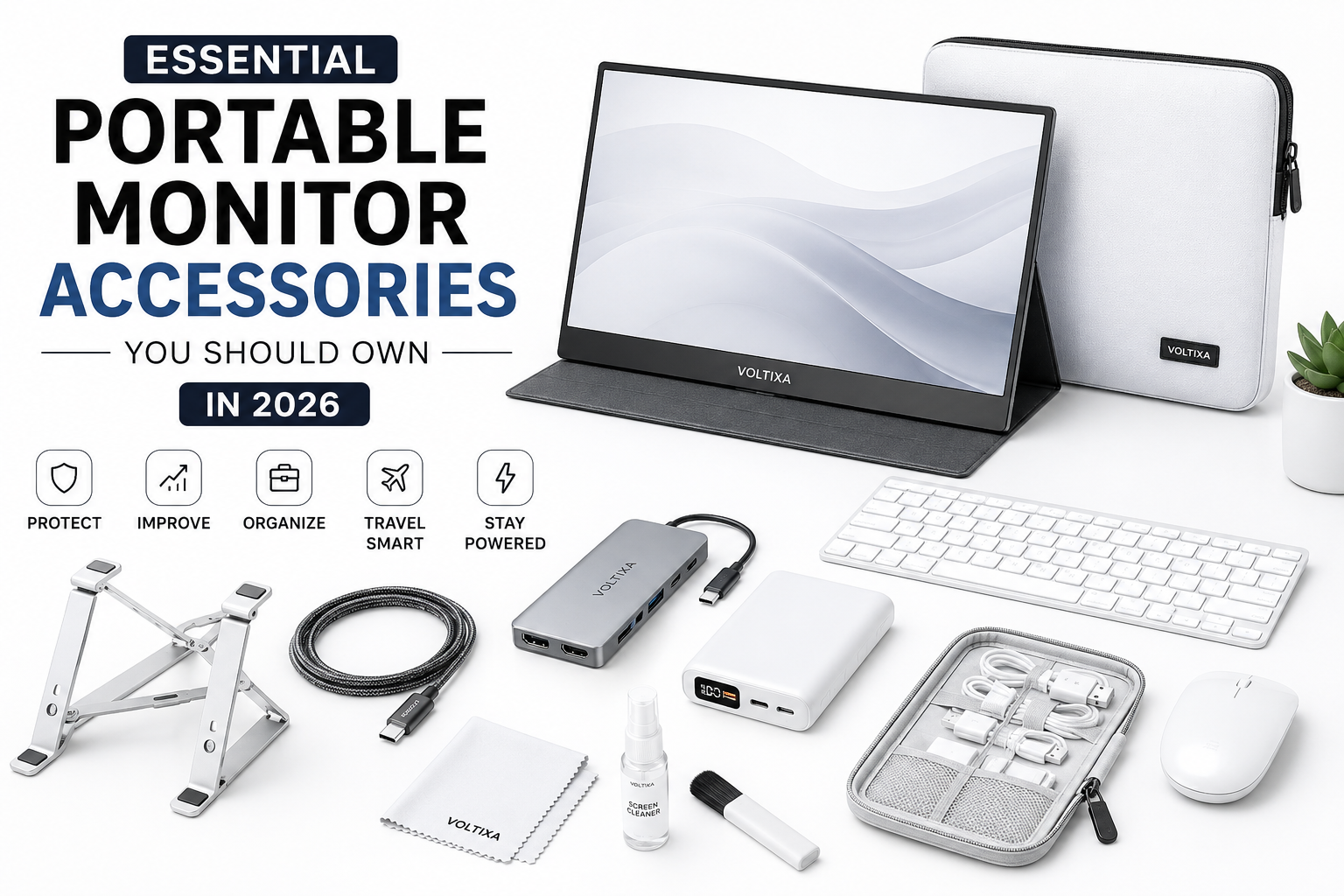
Portable monitors have become one of the most useful productivity tools in recent years. Whether you’re a remote worker, college student, gamer, programmer, content creator, photographer, or business traveler, a portable monitor allows you to extend your screen space wherever you go. Instead of being limited to a single laptop display, you can comfortably multitask, edit videos, analyze spreadsheets, write code, or enjoy games on a larger workspace.
However, owning a portable monitor alone isn’t enough to get the best experience. The right accessories can dramatically improve usability, comfort, durability, and overall performance. Many users spend hundreds of dollars on a premium portable monitor but overlook affordable accessories that protect their investment and make daily use much easier.
In 2026, manufacturers are introducing lighter monitors with higher refresh rates, OLED panels, USB-C connectivity, and better portability. At the same time, a wide range of accessories has become available to enhance productivity, improve ergonomics, simplify cable management, and keep your monitor safe while traveling.
This guide covers the essential portable monitor accessories you should own in 2026, explaining why each accessory matters, who should buy it, and how to choose the right one. Whether you’ve just purchased your first portable monitor or you’re upgrading your mobile workstation, this guide will help you build the perfect setup.
Quick Overview of Essential Accessories
| Accessory | Importance | Best For |
|---|---|---|
| Protective Sleeve | ⭐⭐⭐⭐⭐ | Everyone |
| USB-C Cable | ⭐⭐⭐⭐⭐ | Daily users |
| HDMI Adapter | ⭐⭐⭐⭐☆ | Older laptops & consoles |
| Adjustable Stand | ⭐⭐⭐⭐⭐ | Office & remote work |
| Portable Power Bank | ⭐⭐⭐⭐⭐ | Travelers |
| USB Hub | ⭐⭐⭐⭐☆ | Professionals |
| Screen Protector | ⭐⭐⭐⭐☆ | Frequent travelers |
| Cleaning Kit | ⭐⭐⭐⭐☆ | All users |
| Cable Organizer | ⭐⭐⭐⭐☆ | Mobile professionals |
| Laptop Stand | ⭐⭐⭐⭐⭐ | Productivity setups |
Why Portable Monitor Accessories Matter
Many people believe that buying a portable monitor is the final step. In reality, it’s just the beginning.
Without the proper accessories, users often experience problems like unstable viewing angles, damaged screens during travel, tangled cables, insufficient ports, uncomfortable posture, and unreliable connectivity.
The right accessories solve these problems while extending the lifespan of your portable monitor.
Some benefits include:
- Better ergonomics
- Improved productivity
- Cleaner workspace
- Faster setup
- Enhanced portability
- Better protection during travel
- Reduced cable clutter
- More device compatibility
Think of accessories as small investments that significantly improve your overall experience.
1. Protective Carrying Sleeve (Must-Have)
A portable monitor is designed to travel with you, making a protective sleeve one of the most important accessories you can buy.
Unlike traditional desktop monitors, portable displays are regularly placed inside backpacks, laptop bags, or suitcases where they can be scratched, bent, or damaged by other items.
A high-quality sleeve protects the screen against:
- Dust
- Minor impacts
- Scratches
- Water splashes
- Pressure from other devices
Many premium sleeves also include separate compartments for cables, chargers, SSDs, adapters, and other accessories.
Why You Need One
Imagine carrying your monitor to a coffee shop every day. After several weeks, tiny scratches begin appearing on the screen because it rubs against your laptop charger inside your backpack.
A protective sleeve prevents these problems entirely.
Features to Look For
Soft Interior
Microfiber or velvet lining protects the display from scratches.
Water Resistance
Accidental spills are common while traveling.
Water-resistant materials provide extra protection.
Shock Absorption
Padded corners help reduce damage from accidental drops.
Accessory Pocket
Separate storage keeps cables organized and prevents them from scratching the display.
Lightweight Design
Since portability is the goal, avoid bulky cases.
Pros
- Excellent protection
- Easy to carry
- Prevents scratches
- Organizes accessories
- Affordable investment
Cons
- Premium sleeves cost more
- Very slim sleeves offer limited drop protection
2. High-Quality USB-C Cable
Many connectivity issues blamed on portable monitors are actually caused by poor-quality USB-C cables.
Cheap cables may support charging but fail to transmit high-resolution video or deliver enough power.
Investing in a certified USB-C cable ensures reliable performance.
Why It Matters
Modern portable monitors often rely on a single USB-C cable for:
- Video output
- Audio transmission
- Power delivery
- Data transfer
A low-quality cable may cause:
- Random disconnections
- Flickering screens
- Lower resolutions
- Charging failures
- Slow power delivery
What to Look For
USB 3.2 or USB4 Support
Provides faster data transfer and improved compatibility.
Power Delivery (PD)
Choose cables supporting at least 100W.
Even if your monitor doesn’t require that much power today, the cable remains future-proof.
4K or Higher Video Support
Supports crisp image quality and smooth performance.
Durable Braided Exterior
Braided cables last significantly longer than standard rubber cables.
Reinforced Connectors
Frequent plugging and unplugging can wear out cheap connectors quickly.
USB-C Cable Comparison
| Feature | Cheap Cable | Premium Cable |
|---|---|---|
| Video Support | Limited | 4K/8K |
| Charging Speed | Slow | Fast PD |
| Durability | Low | Excellent |
| Lifespan | Short | Long |
| Data Speed | Slow | High-Speed |
3. Adjustable Portable Monitor Stand
Many portable monitors include a built-in folding cover that acts as a stand.
While convenient, these stands usually offer very limited viewing angles.
An adjustable stand provides significantly better comfort during long working sessions.
If you spend several hours coding, writing, editing videos, or attending meetings, an ergonomic viewing angle can reduce neck strain and improve posture.
Benefits
- Better posture
- Adjustable height
- Multiple viewing angles
- Increased stability
- Improved productivity
Types of Portable Monitor Stands
Foldable Aluminum Stand
Perfect for travel.
Lightweight, durable, and easy to pack.
Adjustable Desktop Stand
Offers greater flexibility with height adjustment.
Ideal for home offices.
Magnetic Stand
Some modern portable monitors support magnetic attachment systems for quick setup.
Buying Tips
Look for:
- Non-slip rubber feet
- Aluminum construction
- Foldable design
- Weight capacity above your monitor’s weight
- Adjustable tilt angle
Pros
- Comfortable viewing
- Stable support
- Better ergonomics
- Professional workstation appearance
Cons
- Adds extra weight
- Premium models cost more
4. HDMI Adapter or USB-C Hub
Although USB-C has become the standard connection for portable monitors, many devices still rely on HDMI.
Older laptops, desktop PCs, gaming consoles, cameras, and media players may require an adapter to connect with your portable display.
A high-quality HDMI adapter or USB-C hub greatly expands your monitor’s compatibility and makes your setup far more versatile.
Why You Need One
Without the proper adapter, you may find that your monitor cannot connect to:
- Older Windows laptops
- Desktop computers
- Gaming consoles
- DSLR and mirrorless cameras
- Streaming devices
- Mini PCs
Instead of purchasing multiple cables for different devices, a reliable USB-C hub or HDMI adapter provides a simple all-in-one solution.
Key Features to Consider
4K Video Output
Even if your portable monitor is Full HD today, choosing a hub that supports 4K output helps future-proof your setup.
Multiple Ports
Look for hubs that include a combination of:
- HDMI
- USB-A
- USB-C
- SD and microSD card readers
- Ethernet (if needed)
Power Delivery (Pass-Through Charging)
A hub with USB-C Power Delivery allows you to charge your laptop while simultaneously using your portable monitor and connected peripherals.
Compact Design
If you travel often, prioritize lightweight, pocket-friendly hubs that won’t add unnecessary bulk to your bag.
5. Portable Power Bank (Perfect for Travel and Remote Work)
One of the biggest advantages of a portable monitor is the ability to work from virtually anywhere. Whether you’re working from a café, airport lounge, coworking space, hotel room, or even outdoors, having a reliable power source ensures your monitor stays powered throughout the day.
While many portable monitors draw power directly from a laptop, this can significantly reduce your laptop’s battery life. A high-capacity power bank with USB-C Power Delivery (PD) can power your monitor independently, allowing both devices to last much longer.
For digital nomads, business travelers, and students, this accessory quickly becomes indispensable.
Why You Need One
Imagine you’re editing a presentation during a five-hour flight. Your laptop battery is already under pressure, and connecting a portable monitor drains it even faster. A power bank capable of delivering sufficient wattage keeps your monitor running without relying entirely on your laptop.
This setup is especially useful when electrical outlets are unavailable.
Key Features to Look For
High Capacity
Choose a power bank with at least 20,000mAh capacity for extended usage. Heavy users may prefer 25,000mAh or more, depending on airline regulations.
USB-C Power Delivery (PD)
Not every USB-C power bank supports the wattage required by portable monitors.
Look for:
- 45W minimum
- 65W recommended
- 100W for maximum compatibility
Multiple Output Ports
Multiple USB-C and USB-A ports allow you to charge your:
- Laptop
- Portable monitor
- Smartphone
- Wireless earbuds
- Tablet
simultaneously.
Fast Recharging
A power bank that supports fast input charging minimizes downtime between uses.
Pros
- Extends working hours
- Reduces laptop battery drain
- Ideal for travel
- Charges multiple devices
- Excellent backup during power outages
Cons
- Larger capacities are heavier
- Premium PD models are more expensive
6. Screen Protector
Portable monitors are designed to move around frequently, making them more susceptible to scratches, fingerprints, and accidental damage than traditional desktop displays.
A quality screen protector provides an extra layer of defense without noticeably affecting display quality.
Depending on your needs, you can choose between glossy, matte, or privacy screen protectors.
Types of Screen Protectors
Matte Screen Protector
Best for:
- Office environments
- Outdoor use
- Bright rooms
Benefits include:
- Reduced glare
- Fewer fingerprints
- Better visibility under sunlight
Clear Glossy Protector
Ideal for users who prioritize image quality and vibrant colors.
Perfect for:
- Photo editing
- Video editing
- Entertainment
Privacy Screen Protector
A privacy filter narrows the viewing angle, preventing nearby people from viewing your screen.
Excellent for:
- Business travelers
- Financial professionals
- Students working in public places
Buying Tips
Choose a protector that offers:
- Bubble-free installation
- Scratch resistance
- Fingerprint resistance
- High transparency
- Precise fit for your monitor model
Pros
- Prevents scratches
- Easy to replace
- Reduces fingerprints
- Improves resale value
- Adds extra protection
Cons
- Cheap protectors reduce image quality
- Incorrect installation can trap dust
7. Laptop Stand
A portable monitor works best when paired with an ergonomic laptop setup.
Without a laptop stand, users often end up looking down at one screen and straight ahead at another, creating an uncomfortable working posture.
A laptop stand raises your laptop closer to eye level, allowing both displays to sit at a more comfortable height.
This simple adjustment can significantly reduce neck, shoulder, and back strain during long work sessions.
Benefits
A laptop stand helps:
- Improve posture
- Reduce neck pain
- Increase airflow under the laptop
- Prevent overheating
- Create a more professional workstation
Many foldable aluminum stands weigh less than one pound, making them easy to carry alongside your portable monitor.
Features to Look For
Adjustable Height
Allows you to align your laptop with the portable monitor.
Aluminum Construction
Provides durability while improving heat dissipation.
Foldable Design
Ideal for professionals who travel frequently.
Anti-Slip Rubber Pads
Prevent accidental movement during typing.
Pros
- Better ergonomics
- Improved cooling
- Lightweight
- Portable
- Professional appearance
Cons
- Occupies additional desk space
- Very lightweight models may wobble
8. Microfiber Cleaning Kit
Portable monitors are constantly exposed to fingerprints, dust, smudges, and dirt.
Cleaning the display using tissues, paper towels, or regular cloth can permanently damage the anti-glare coating.
Instead, invest in a proper cleaning kit designed specifically for electronic displays.
A basic kit usually includes:
- Microfiber cloth
- Cleaning solution
- Dust removal brush
- Air blower
Some premium kits also include cleaning wipes and reusable storage pouches.
Best Practices
Always:
- Turn off the monitor before cleaning.
- Spray the solution onto the cloth—not directly onto the screen.
- Wipe gently using circular motions.
- Store the cloth in a clean pouch to avoid transferring dust.
Avoid:
- Glass cleaners
- Alcohol-based household cleaners
- Rough fabrics
- Excessive pressure
Pros
- Maintains display quality
- Removes fingerprints
- Safe for coated screens
- Affordable
- Easy to carry
Cons
- Cleaning solution requires occasional replacement
9. Cable Organizer
As your portable workstation grows, so does the number of cables.
A typical setup may include:
- USB-C cable
- HDMI cable
- Laptop charger
- Phone charger
- Mouse receiver
- SSD cable
- Earphone cable
Without proper organization, cables quickly become tangled inside your backpack.
A cable organizer keeps everything neatly stored and easy to access.
Benefits
Using a cable organizer:
- Saves time
- Prevents cable damage
- Keeps your bag organized
- Reduces clutter
- Protects connectors
Many organizers include elastic loops, mesh pockets, and zippered compartments for adapters and memory cards.
Features to Consider
Choose an organizer with:
- Water-resistant exterior
- Padded interior
- Adjustable compartments
- Lightweight construction
- Durable zipper
Pros
- Organized storage
- Faster setup
- Protects accessories
- Easy to travel with
Cons
- Another item to carry
- Larger organizers take more bag space
10. Wireless Keyboard and Mouse
While not mandatory, a wireless keyboard and mouse can completely transform your portable monitor experience.
If you’re working on documents, coding, graphic design, or spreadsheets, relying solely on a laptop keyboard and touchpad can become tiring over long periods.
A wireless setup allows you to position your laptop and portable monitor independently, creating a more comfortable and efficient workspace.
Advantages
A wireless keyboard and mouse provide:
- Greater typing comfort
- Improved productivity
- Flexible desk arrangement
- Reduced cable clutter
- Better ergonomics
Bluetooth models are especially convenient because they don’t require additional USB receivers, leaving more ports available for other accessories.
Buying Tips
When selecting a wireless keyboard and mouse:
- Choose Bluetooth connectivity for fewer dongles.
- Look for long battery life or rechargeable models.
- Ensure the keyboard layout suits your workflow.
- Consider compact, travel-friendly designs if portability is important.
- Check compatibility with Windows, macOS, Linux, Android, or iPadOS if you use multiple devices.
Pros
- Comfortable for extended work sessions
- Portable and lightweight
- Cleaner workspace
- Easy multi-device pairing on many models
Cons
- Requires charging or battery replacement
- Premium ergonomic models can be expensive
Bonus Accessories Worth Considering
Although the accessories above are the most essential, a few additional items can further improve your portable monitor setup depending on your workflow.
Adjustable LED Desk Lamp
If you often work in dim environments, an adjustable LED lamp reduces eye strain and improves visibility without causing excessive screen glare.
Portable SSD
A fast external SSD is invaluable for photographers, videographers, and professionals working with large files. It provides quick access to projects without consuming your laptop’s internal storage.
Noise-Canceling Headphones
For remote workers and frequent travelers, noise-canceling headphones help maintain focus in busy cafés, airports, and shared workspaces.
Webcam
Some portable monitors do not include a built-in webcam. An external webcam offers better video quality for online meetings and virtual interviews.
Foldable Laptop Cooling Pad
If your laptop runs hot during gaming, video editing, or software development, a portable cooling pad can improve airflow and maintain consistent performance.
Building the Ideal Portable Workstation
Instead of purchasing every accessory immediately, prioritize based on your needs and budget.
A beginner’s setup might include:
- Protective carrying sleeve
- High-quality USB-C cable
- Adjustable stand
- Cleaning kit
A professional mobile workstation could add:
- High-capacity power bank
- USB-C hub
- Laptop stand
- Wireless keyboard and mouse
- Cable organizer
- Screen protector
Choosing accessories strategically ensures you invest in items that genuinely improve your workflow rather than buying products you’ll rarely use.
Complete Buying Guide: How to Choose the Right Portable Monitor Accessories
Not every portable monitor user needs the same accessories. A college student who occasionally uses a second screen has very different requirements from a software developer, photographer, or business traveler who relies on a portable workstation every day.
Instead of purchasing every accessory available, focus on products that genuinely improve your workflow, comfort, and productivity.
The following factors should help you make smarter buying decisions.
1. Check Compatibility First
Before buying any accessory, ensure it is compatible with your portable monitor and primary device.
For example, many newer portable monitors support a single USB-C cable for both power and video, while older laptops may require HDMI and a separate USB cable for power.
Similarly, not every USB-C cable supports video output. Some are designed only for charging or data transfer.
Always verify:
- Monitor ports
- Laptop ports
- Console compatibility
- USB-C video support
- Power Delivery (PD) requirements
- Operating system compatibility
Buying incompatible accessories is one of the most common mistakes users make.
2. Prioritize Build Quality
Cheap accessories may save money initially, but they often fail much sooner than premium alternatives.
A poorly made USB-C cable can cause random display flickering, while a low-quality stand may wobble or collapse under the monitor’s weight.
Look for features such as:
- Aluminum construction
- Reinforced cable connectors
- Braided cables
- Durable zippers
- Scratch-resistant materials
- Non-slip rubber feet
- High-quality hinges
Quality accessories typically last for years, making them a better long-term investment.
3. Consider Your Usage Scenario
Think about where and how you use your portable monitor most often.
If You Travel Frequently
Prioritize lightweight accessories such as:
- Foldable stand
- Carrying sleeve
- Cable organizer
- Compact USB-C hub
- Portable power bank
If You Work from Home
Comfort becomes more important than portability.
Choose:
- Adjustable monitor stand
- Laptop stand
- Wireless keyboard
- Wireless mouse
- External webcam
- Desk lighting
If You’re a Gamer
Look for accessories that support:
- High refresh rates
- Low-latency connections
- Stable power delivery
- Durable HDMI cables
- Cooling solutions
If You’re a Content Creator
Focus on accessories that improve efficiency, including:
- Fast USB-C hubs
- External SSD
- Color-accurate screen protector
- Card readers
- Adjustable stands
Choosing accessories based on your daily workflow ensures you spend your budget wisely.
4. Don’t Ignore Ergonomics
Many users focus only on connectivity while overlooking comfort.
Poor posture can lead to:
- Neck pain
- Shoulder pain
- Wrist discomfort
- Eye strain
- Fatigue
Investing in ergonomic accessories such as adjustable stands, laptop stands, and external keyboards can significantly improve your working experience, especially if you spend several hours each day using your portable monitor.
Comparison Table: Essential Accessories at a Glance
| Accessory | Beginner | Professional | Traveler | Gamer | Content Creator |
|---|---|---|---|---|---|
| Protective Sleeve | ⭐⭐⭐⭐⭐ | ⭐⭐⭐⭐⭐ | ⭐⭐⭐⭐⭐ | ⭐⭐⭐⭐ | ⭐⭐⭐⭐ |
| USB-C Cable | ⭐⭐⭐⭐⭐ | ⭐⭐⭐⭐⭐ | ⭐⭐⭐⭐⭐ | ⭐⭐⭐⭐⭐ | ⭐⭐⭐⭐⭐ |
| Adjustable Stand | ⭐⭐⭐⭐ | ⭐⭐⭐⭐⭐ | ⭐⭐⭐⭐ | ⭐⭐⭐⭐ | ⭐⭐⭐⭐⭐ |
| USB-C Hub | ⭐⭐⭐ | ⭐⭐⭐⭐⭐ | ⭐⭐⭐⭐ | ⭐⭐⭐⭐ | ⭐⭐⭐⭐⭐ |
| Power Bank | ⭐⭐⭐ | ⭐⭐⭐⭐ | ⭐⭐⭐⭐⭐ | ⭐⭐⭐ | ⭐⭐⭐⭐ |
| Screen Protector | ⭐⭐⭐⭐ | ⭐⭐⭐⭐ | ⭐⭐⭐⭐⭐ | ⭐⭐⭐ | ⭐⭐⭐⭐ |
| Laptop Stand | ⭐⭐⭐ | ⭐⭐⭐⭐⭐ | ⭐⭐⭐⭐ | ⭐⭐⭐ | ⭐⭐⭐⭐⭐ |
| Cleaning Kit | ⭐⭐⭐⭐⭐ | ⭐⭐⭐⭐⭐ | ⭐⭐⭐⭐⭐ | ⭐⭐⭐⭐ | ⭐⭐⭐⭐⭐ |
| Cable Organizer | ⭐⭐⭐⭐ | ⭐⭐⭐⭐⭐ | ⭐⭐⭐⭐⭐ | ⭐⭐⭐⭐ | ⭐⭐⭐⭐⭐ |
| Wireless Keyboard & Mouse | ⭐⭐⭐ | ⭐⭐⭐⭐⭐ | ⭐⭐⭐⭐ | ⭐⭐⭐⭐ | ⭐⭐⭐⭐⭐ |
Budget Planning Guide
Not everyone needs to buy every accessory at once. Building your setup gradually is often the smartest approach.
| Budget | Recommended Accessories |
|---|---|
| Under $50 | Protective sleeve, USB-C cable, cleaning kit |
| $50–$100 | Add an adjustable stand and cable organizer |
| $100–$200 | Include a USB-C hub and laptop stand |
| $200+ | Complete setup with power bank, wireless keyboard, mouse, and premium accessories |
Starting with the essentials allows you to improve your setup over time without overspending.
Common Mistakes to Avoid
Many users make small purchasing mistakes that reduce the effectiveness of their portable monitor setup. Avoiding these issues can save both money and frustration.
Buying the Cheapest USB-C Cable
One of the biggest mistakes is assuming that all USB-C cables are identical.
In reality, some cables only support charging, while others handle video output, data transfer, and high-speed charging.
Always verify the cable’s specifications before purchasing.
Ignoring Power Requirements
Some portable monitors require higher wattage than a standard USB charger can provide.
Using an underpowered charger may result in:
- Screen flickering
- Random shutdowns
- Low brightness
- Unstable connections
Always choose chargers and power banks that meet or exceed your monitor’s recommended power requirements.
Choosing an Unstable Stand
A flimsy stand can wobble while typing or even allow the monitor to tip over.
Look for sturdy aluminum construction and anti-slip rubber feet for better stability.
Forgetting Screen Protection
Many users only think about protection after their monitor has already been scratched.
A protective sleeve and screen protector are inexpensive compared to the cost of replacing a damaged display.
Buying Accessories You Don’t Need
Not every user requires every available accessory.
For example:
- Casual users may not need a USB-C hub.
- Travelers may not need a desktop stand.
- Gamers may prioritize HDMI cables over privacy screen protectors.
Purchase accessories that match your actual workflow rather than following trends.
Expert Recommendations
After evaluating the most useful accessories for portable monitors in 2026, several stand out as worthwhile investments for almost every user.
Must-Have Accessories
If you’re purchasing your first portable monitor, prioritize these items:
- Protective carrying sleeve
- Certified USB-C cable
- Adjustable monitor stand
- Cleaning kit
These accessories improve durability, reliability, and everyday usability.
Best Value Upgrades
Once your basic setup is complete, consider adding:
- USB-C hub
- Laptop stand
- Cable organizer
These upgrades help create a cleaner, more efficient workspace.
Premium Productivity Setup
Professionals who rely on portable monitors daily may benefit from:
- High-capacity power bank
- Wireless keyboard and mouse
- External SSD
- Privacy screen protector
- Foldable ergonomic stand
Although these accessories require a larger investment, they significantly improve comfort and productivity over time.
Pros and Cons of Building a Complete Accessory Kit
| Pros | Cons |
|---|---|
| Better productivity | Higher initial cost |
| Improved ergonomics | More items to carry |
| Longer monitor lifespan | Requires careful accessory selection |
| Cleaner workspace | Premium accessories can be expensive |
| Easier travel | Some accessories add extra weight |
| Better device compatibility | Not every accessory is necessary for every user |
Who Should Buy These Accessories?
While almost every portable monitor owner can benefit from additional accessories, certain users will notice the biggest improvements.
Students
Students often carry their devices between classrooms, libraries, and study spaces.
A protective sleeve, adjustable stand, and USB-C cable help create a reliable and portable study setup.
Remote Workers
Remote professionals frequently switch between home offices, coworking spaces, and cafés.
Accessories like a laptop stand, wireless keyboard, USB-C hub, and cable organizer can greatly improve productivity and comfort.
Business Travelers
Frequent travelers need lightweight accessories that maximize convenience.
A portable power bank, carrying sleeve, compact USB-C hub, and privacy screen protector make it easier to work securely from airports, hotels, and shared workspaces.
Gamers
Portable monitors are increasingly popular for console gaming and LAN events.
Gamers should prioritize high-quality HDMI cables, stable stands, and reliable power solutions to ensure smooth performance and minimal interruptions.
Content Creators
Photographers, video editors, designers, and digital artists often rely on portable monitors for color-accurate previews and expanded workspace.
Accessories such as external SSDs, adjustable stands, premium USB-C hubs, and cleaning kits help maintain an efficient and professional workflow.
Frequently Asked Questions (FAQs)
1. What are the most important accessories for a portable monitor?
If you’re just getting started, the four most important accessories are a protective carrying sleeve, a high-quality USB-C cable, an adjustable monitor stand, and a microfiber cleaning kit. These accessories improve durability, reliability, and everyday usability without requiring a large investment.
2. Do I need a special USB-C cable for a portable monitor?
Yes. Not all USB-C cables support video output. Some are designed only for charging or data transfer. Choose a certified USB-C cable that supports DisplayPort Alt Mode, Power Delivery (PD), and high-speed data transfer to ensure stable video and power connections.
3. Can a power bank run a portable monitor?
Yes. Many modern portable monitors can be powered by a USB-C Power Delivery power bank. For the best experience, choose a model with at least 20,000mAh capacity and 45W–65W USB-C PD output. This is especially useful for travel, remote work, and locations without easy access to power outlets.
4. Is a portable monitor stand better than the built-in cover stand?
In most cases, yes. Built-in folding covers are convenient but usually offer limited viewing angles and stability. An adjustable aluminum stand provides better ergonomics, improved posture, and greater flexibility for long work sessions.
5. Should I use a screen protector on a portable monitor?
If you travel frequently or carry your monitor in a backpack, a screen protector is a smart investment. It helps prevent scratches, reduces fingerprints, and can improve the monitor’s resale value. Matte protectors are excellent for reducing glare, while privacy filters are ideal for working in public places.
6. What accessories are best for remote workers?
Remote workers should consider:
- Adjustable monitor stand
- Laptop stand
- USB-C hub
- Wireless keyboard and mouse
- Cable organizer
- Cleaning kit
These accessories create a more comfortable and productive workspace for daily use.
7. Can I connect a gaming console to a portable monitor?
Yes. Most portable monitors support gaming consoles such as the PlayStation, Xbox, and Nintendo Switch. Depending on your monitor and console, you may need an HDMI cable or a USB-C to HDMI adapter. A reliable power source is also recommended for uninterrupted gameplay.
8. How can I protect my portable monitor while traveling?
Use a padded carrying sleeve, avoid placing heavy objects on top of the monitor, organize cables separately, and clean the display regularly with a microfiber cloth. These simple habits significantly reduce the risk of scratches and accidental damage.
9. Is a USB-C hub necessary?
Not for everyone. If your laptop already has enough ports, you may not need one. However, professionals who connect multiple devices—such as external drives, SD cards, keyboards, and HDMI displays—will benefit greatly from a quality USB-C hub.
10. How often should I clean my portable monitor?
For regular users, wiping the screen once or twice a week with a microfiber cloth is usually sufficient. If you travel frequently or use the monitor in dusty environments, clean it more often to maintain image quality and prevent buildup.
11. Are expensive accessories always better?
Not necessarily. While premium accessories often provide better durability and performance, many mid-range options offer excellent value. Focus on compatibility, build quality, and user reviews rather than choosing the most expensive product.
12. Can these accessories improve productivity?
Absolutely. Accessories like adjustable stands, wireless peripherals, USB-C hubs, and cable organizers reduce setup time, improve ergonomics, and create a cleaner workspace. Even small upgrades can make daily tasks more comfortable and efficient.
Final Thoughts
A portable monitor is one of the best productivity investments you can make, but the right accessories are what truly unlock its full potential. From protecting your display during travel to creating a comfortable dual-screen workstation, each accessory plays a unique role in improving your overall experience.
If you’re on a limited budget, start with the essentials: a protective sleeve, a reliable USB-C cable, an adjustable stand, and a cleaning kit. As your needs grow, you can expand your setup with a USB-C hub, laptop stand, portable power bank, wireless keyboard, and cable organizer.
The key is to invest in accessories that match your workflow rather than buying every product available. Whether you’re a student attending online classes, a remote professional managing multiple projects, a gamer seeking a portable setup, or a content creator working on the go, choosing the right accessories will help you stay productive, organized, and comfortable wherever you work.
By making thoughtful purchasing decisions and prioritizing quality over quantity, you’ll not only protect your portable monitor but also create a reliable mobile workstation that can serve you for years to come.
Internal Link Opportunities for Voltixa
- How to Choose the Right Portable Monitor: Complete Buying Guide
- Best Portable Monitors for Remote Work in 2026
- Essential USB Hubs to Buy in 2026 – Complete Buyer’s Guide
- Top Rated Power Banks Reviewed: Which One Is Worth Buying?
- Best External SSDs for Students, Gamers, and Professionals
External Authoritative Sources
Reference these trusted resources where relevant:
- USB Implementers Forum (USB-IF) – https://www.usb.org
- VESA (Display Standards) – https://www.vesa.org
- DisplayPort – https://www.displayport.org
- Intel Thunderbolt Technology – https://www.thunderbolttechnology.net
- Energy Star Electronics Guidance – https://www.energystar.gov